Skip to content
The idea Features Slice Bank Sharing Pizza Party Pricing Privacy Privacy policy Get the app

iPhoneiPadMac

Money.
Pizza.

Well, that's 2 of the 3 great things in life.

We can't make your payslip bigger. We can make sorting it out something you don't dread. Budgeting over a slice keeps the whole thing fun and oddly satisfying. Your income is the dough, every job you give your money is a topping, and the crust is what's left to breathe.

Free forever, properly No bank logins Your financial data stays in your control

A whole pizza seen from above, the way Slice pictures a month of money £850Home & bills £500Food & shops £450Left to breathe

Every screen, no cherry-picking

It looks like this.

Real screenshots from the real app. Light and dark, phone and Mac.

Daily Slice Pizza Night Slice Bank Monthly Slice Pizza Party Daily Slice in dark mode Money Log Slice Bank in dark mode

The whole idea, in one bite

Nobody ever cancelled plans
because a spreadsheet asked nicely.

Budgeting apps mostly do one of two things: nag you, or drown you. Slice does neither. It turns your month into something warm and familiar: a pizza, split into the jobs your money already has. Approachable enough to open on a Tuesday night, honest enough to actually trust.

🍕

Dough

What comes in. Your pay, your side hustle, the birthday tenner from your nan. That's the base everything sits on.

🍅

Toppings

Every job you give a pound. Rent, food, petrol, the gym you keep meaning to cancel. Each one takes up real space.

🥖

Crust

What's left to breathe. Not "surplus", not "disposable income". Just the bit of the month that isn't spoken for yet.

🎉

Pizza Night

Ten minutes, once a month, to plan the whole thing. That's the ritual. The other thirty days take four taps each.

Try it right here

Slice a month. Go on.

Drag the sliders. Watch the pizza change. This is genuinely how the app thinks. No sign-up, no email, nothing saved anywhere. These are your numbers, doing your sums; it is not advice, and nothing here is a recommendation.

£

Crust, left to breathe

£450

That's about £15 a day of breathing room.

THIS MONTH £2,500
Money is stressful. Pizza has never once been stressful. We built your budget out of the second one.
Money. Pizza. 2 out of 3. We'll let you work out which one we can't promise.

What's on the menu

Everything you need.
Nothing you'll dread opening.

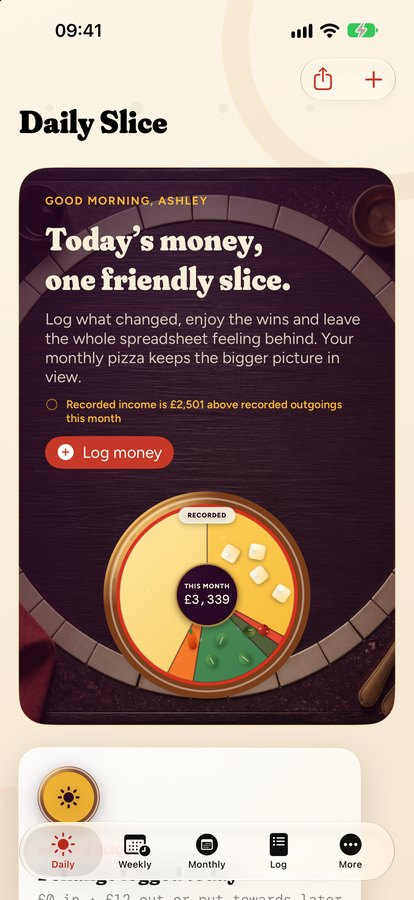
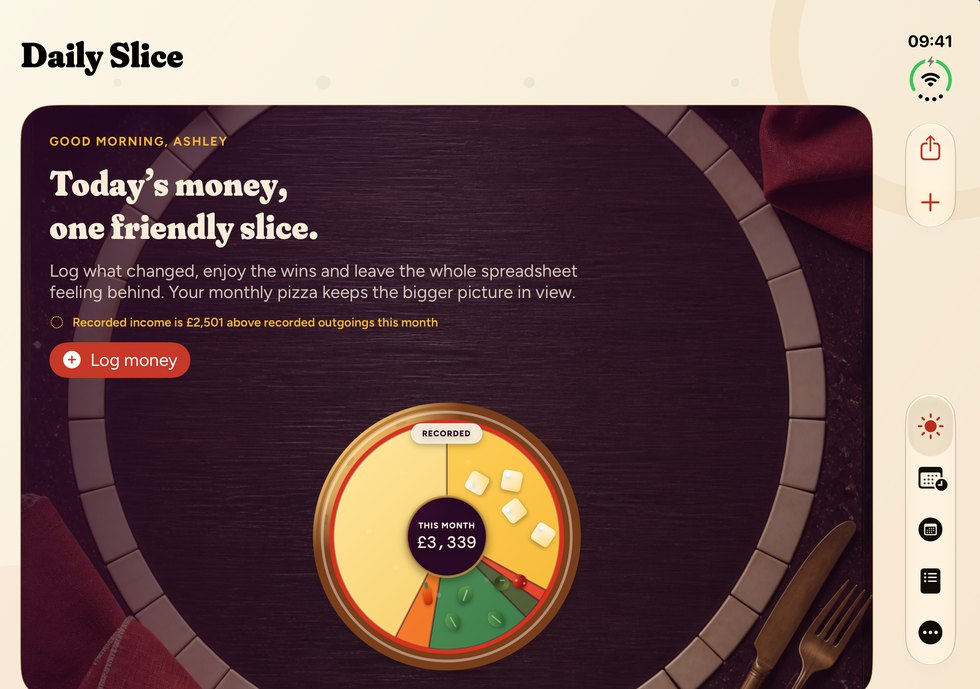
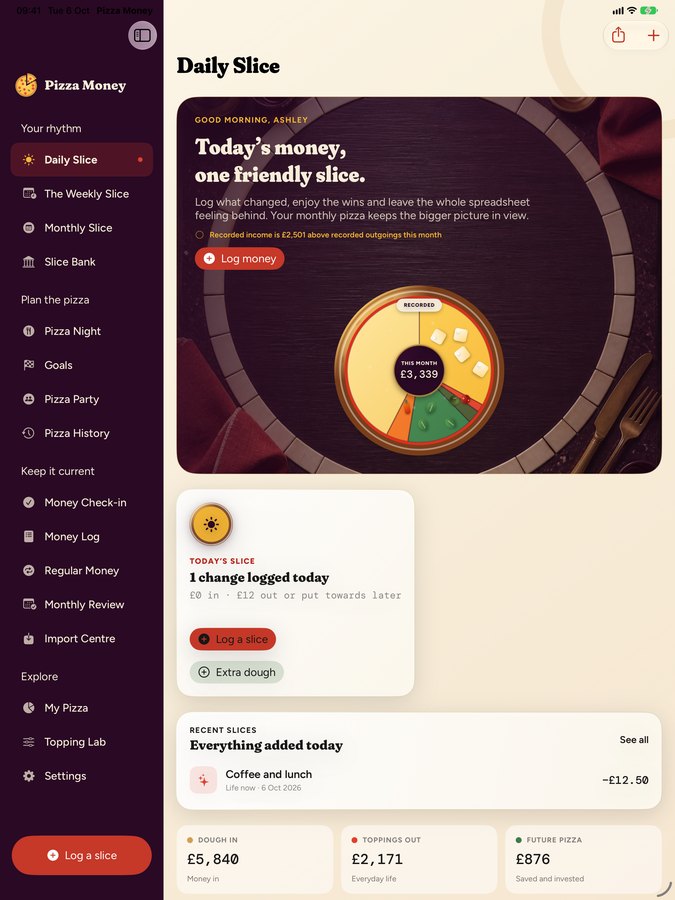
Daily Slice

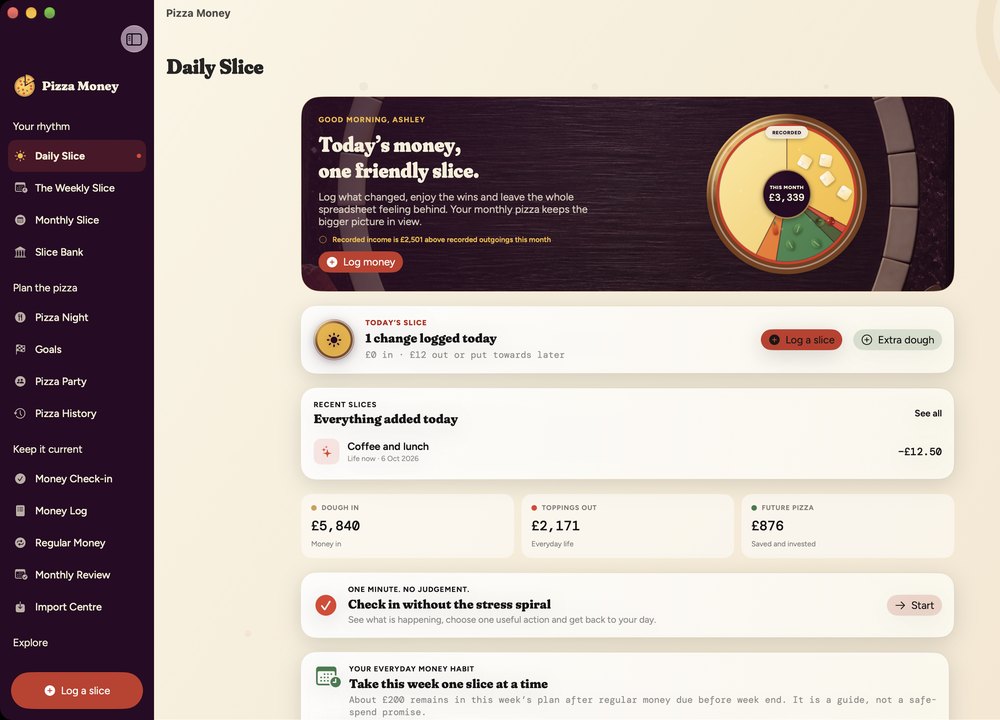
Four taps, and back to your evening

Log what you spent and watch it land on the plate. That's the whole daily ritual, quicker than deciding on a topping and far more satisfying. No receipts to photograph, no categories to argue with, no streak to feel guilty about breaking.

  • Today's slice, sized against the rest of your month
  • Recent entries you can fix with a tap when you fat-finger a zero
  • Your monthly pizza, always one glance away
The Daily Slice screen showing today's money and a monthly pizza

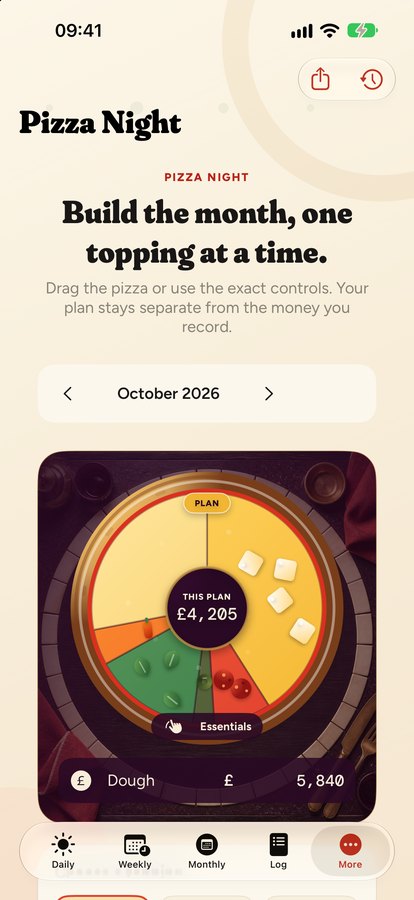
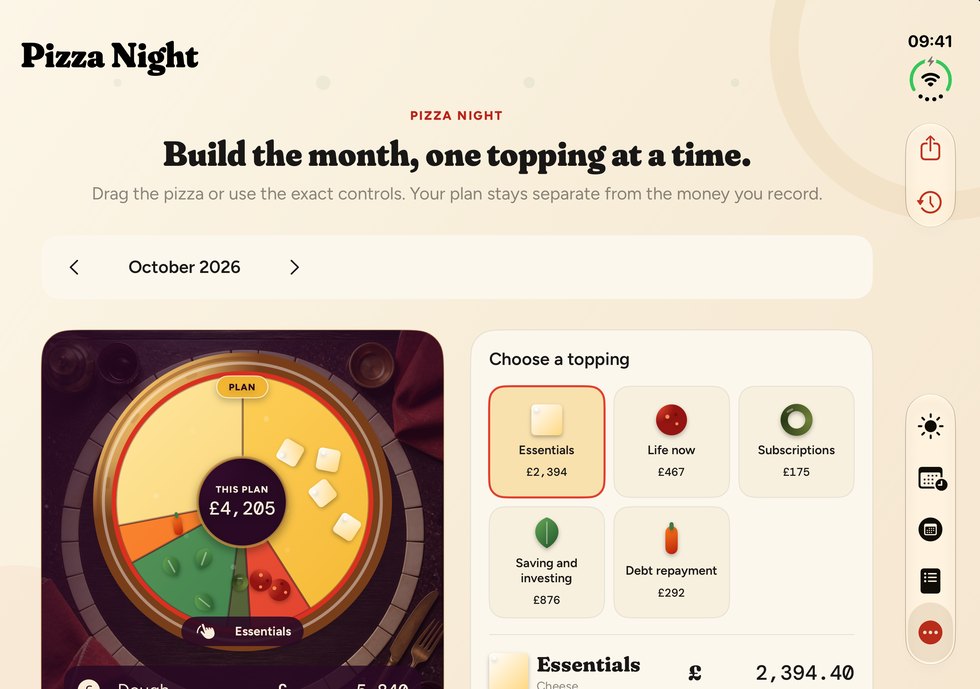
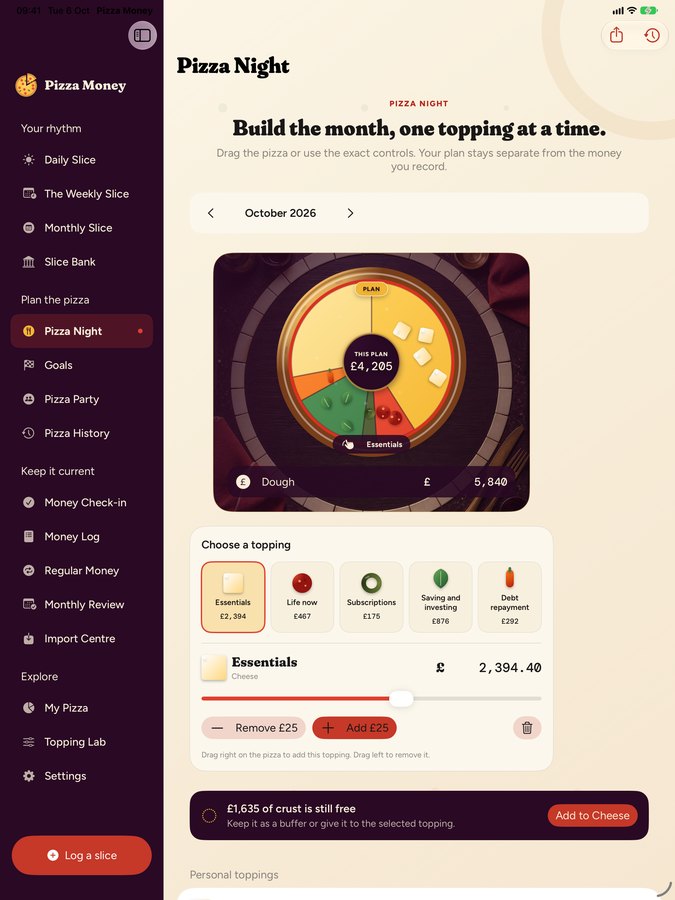
Pizza Night

The ten minutes that make the month easy

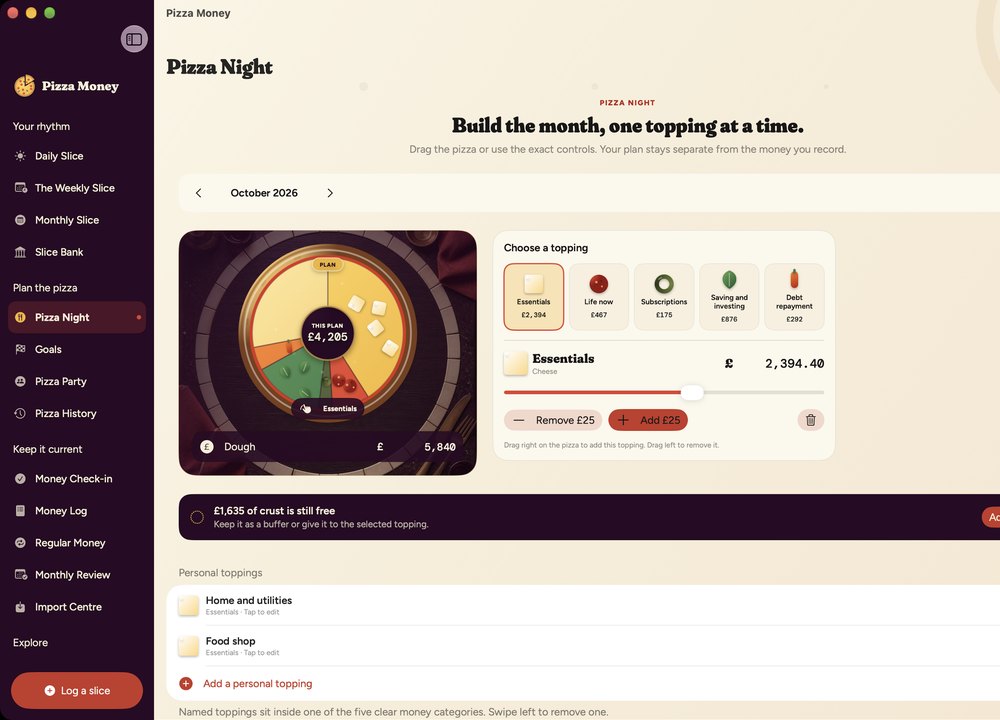
Once a month you sit down with a fresh pizza and give every pound a job. Drag the toppings around, set the amounts, save the plan. It's the only part that asks for real thought, and it's a genuinely pleasant ten minutes, which is not a sentence people usually write about budgeting.

  • Plan and reality stay separate, so history never gets rewritten
  • Copy last month forward when nothing much changed
  • Your own custom toppings, named the way you think
Pizza Night, planning the month's toppings

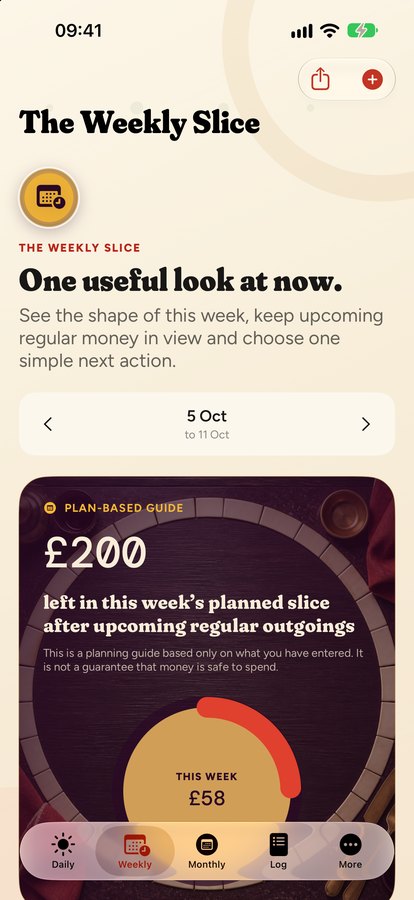
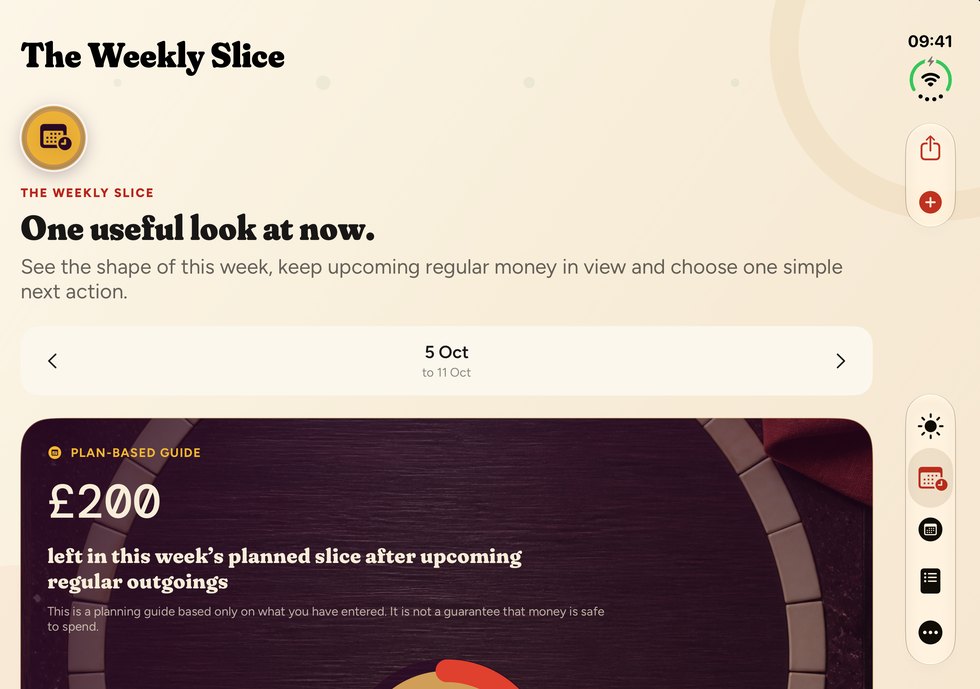
The Weekly Slice

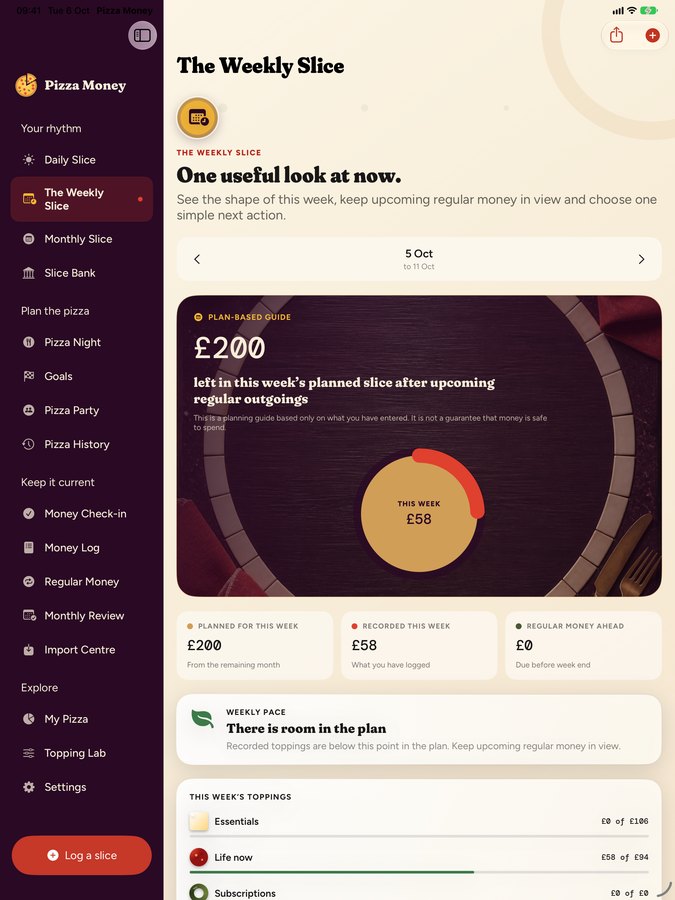
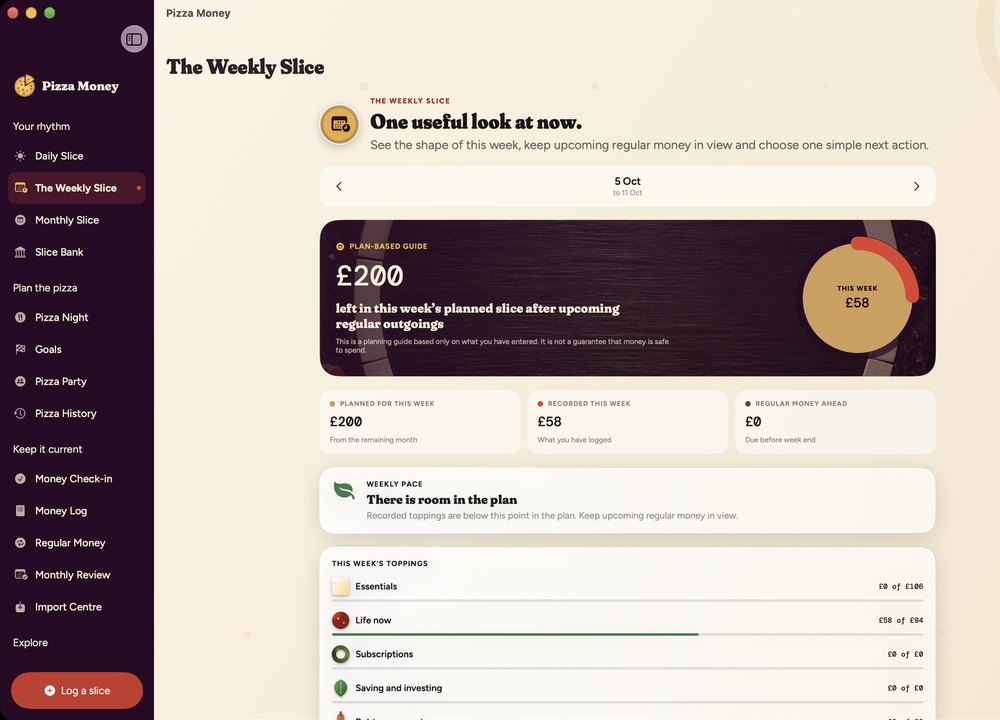
One honest look at right now

What's left this week, what's coming out before payday, and one simple next action. No red warnings, no doom, no little animated character shaking its head at you.

  • Pacing that knows the difference between "fine" and "careful"
  • Upcoming regular money, before it surprises you
  • A single suggested step. Take it or don't
The Weekly Slice screen

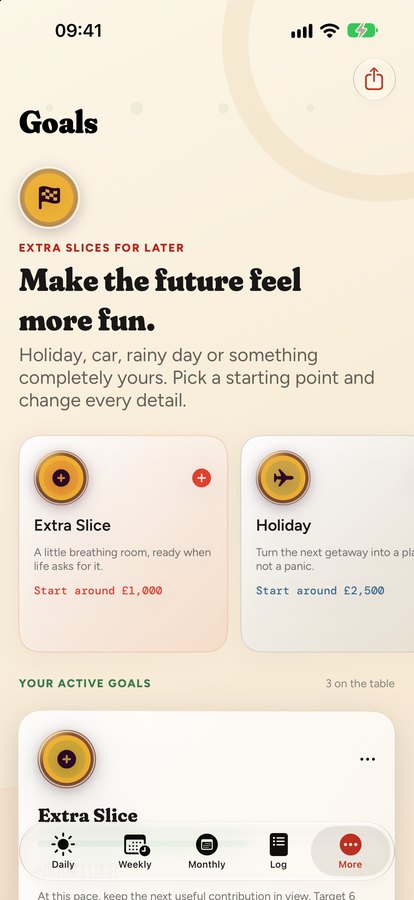
Goals & Regular Money

The boring bits, handled quietly

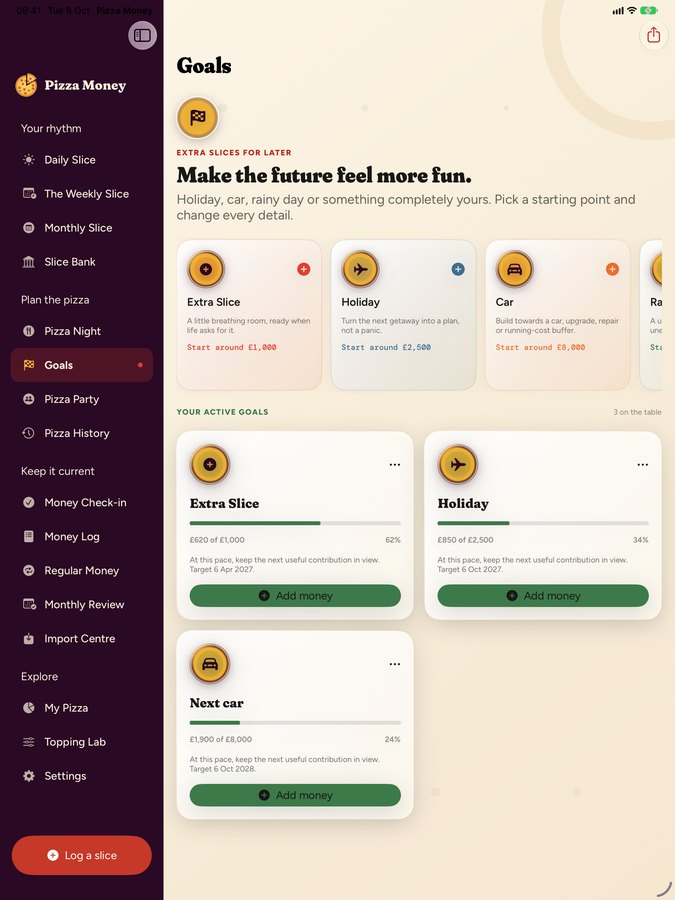
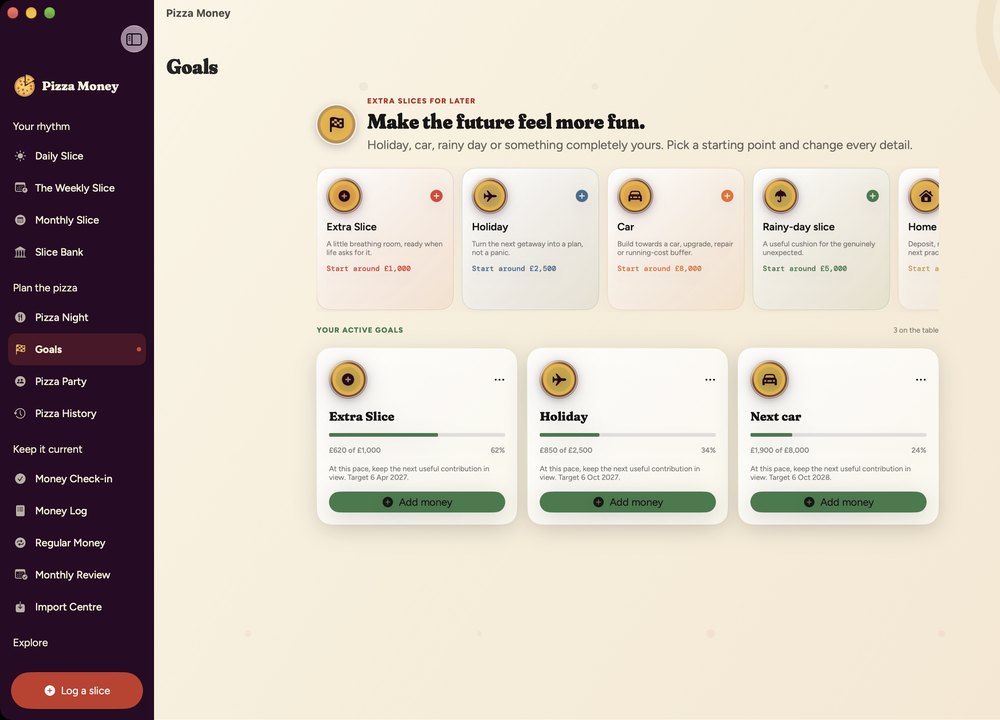
Rent, subscriptions, that direct debit you've forgotten the name of. Slice remembers what's due and when. Crucially, it never invents a transaction you didn't make. Type a payment yourself and it quietly ties the two together.

  • Goals with names: holiday, new car, a buffer that means calm
  • Recurring money with a real history, not a guess
  • Import a statement when you'd rather not type
Goals screen with savings targets

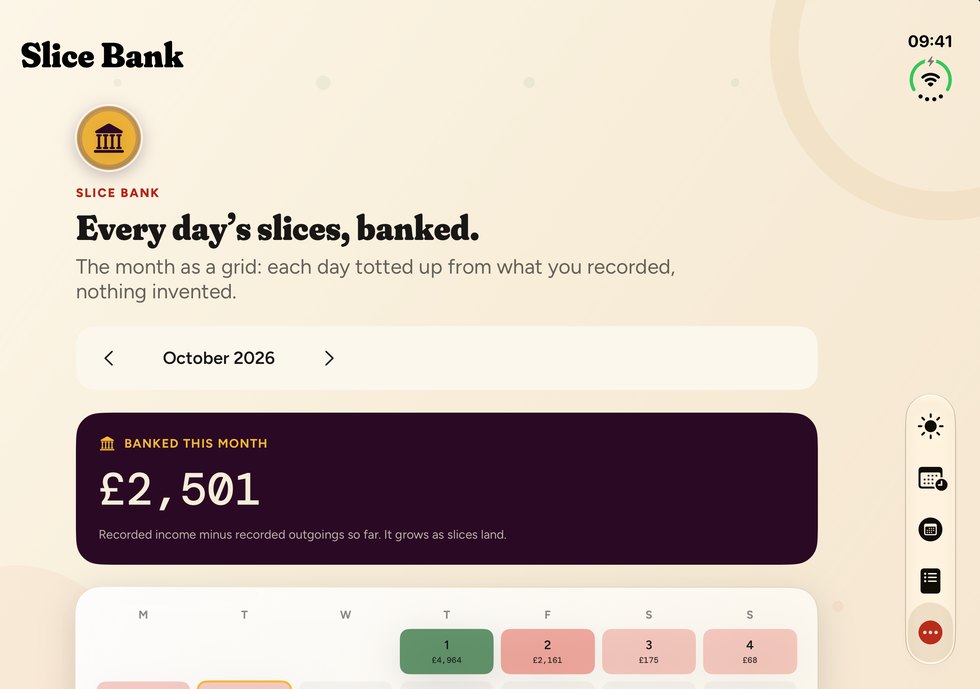
Slice Bank

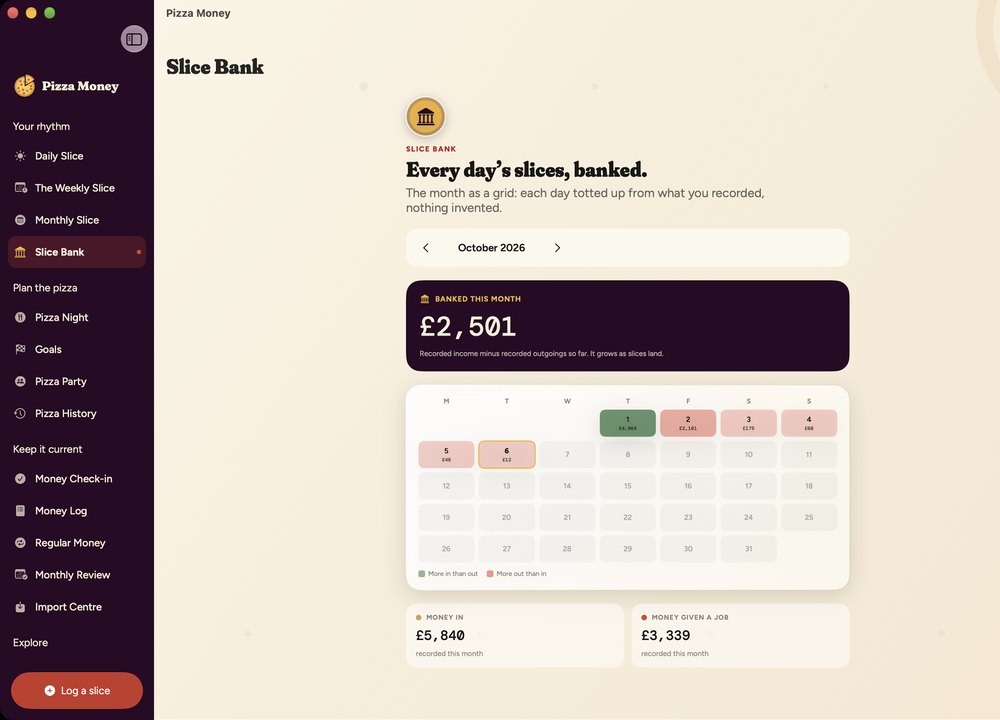
Every day is a slice.
This is the whole month.

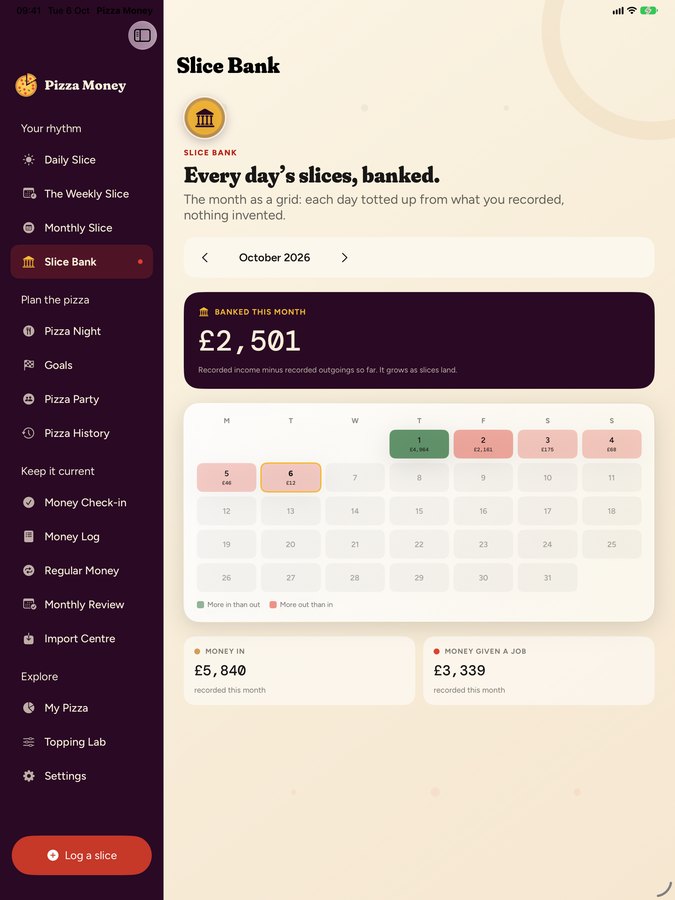
One square, one day, one slice of your money. Green where more came in than went out, red where it didn't, and a running total of everything you've banked so far. Thirty-odd slices laid out at once, and patterns you'd never spot in a list jump straight off the page, like how Thursdays quietly cost you more than Saturdays.

↓ This is a live illustration, built in your browser. Change the currency up top and watch it follow.

Banked this month

£1,635

August 2026

Pounds, euros, dollars

Pizza is the universal language.
Money, sadly, is not.

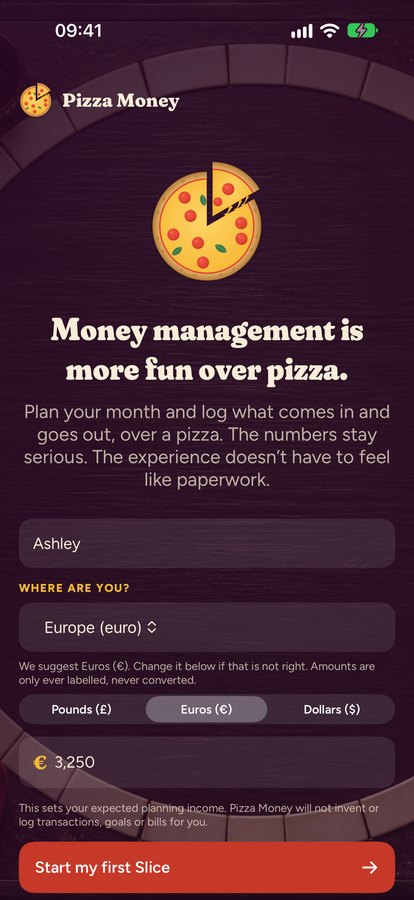
Everyone understands a pizza. Nobody's ever needed it translated. Currency is the awkward one, so Slice asks where you are when you start, suggests the right one, and works natively in pounds, euros or dollars from that moment on. Change it any time in Settings.

Relabelled, never converted. Slice is not a currency converter and does no exchange rates. That is deliberate. Switching currency won't run your history through a rate you never agreed to. £1,635 becomes €1,635: the same number, wearing a different hat. Your records keep meaning exactly what they meant on the day you wrote them down.

Choosing your country and currency when you first open the app

Home Screen widget

Payday, at a glance.

A countdown that never shows an amount, so nobody reading over your shoulder on the train learns a single thing about your finances.

9

9 days to payday

Thursday 25 September

Share Studio

Send the win, not the balance

Had a good month? Cleared a goal? Slice builds you a proper share card: the app's own artwork, your headline, none of your business. Post it, text it, drop it in the group chat.

Exact amounts stay off the card unless you deliberately put them on. The card literally says PRIVATE, and the real number never leaves your device. There's a toggle if you want to show it, but you have to reach for it.

  • Every card rendered on your device, never on a server
  • Pizza Party invitations go through Apple's share sheet, straight to the person you pick, with no public links
  • Works with Messages, Mail, Instagram, anywhere the share sheet reaches
The Share Studio, showing a Weekly Slice card marked PRIVATE with exact amounts kept off it

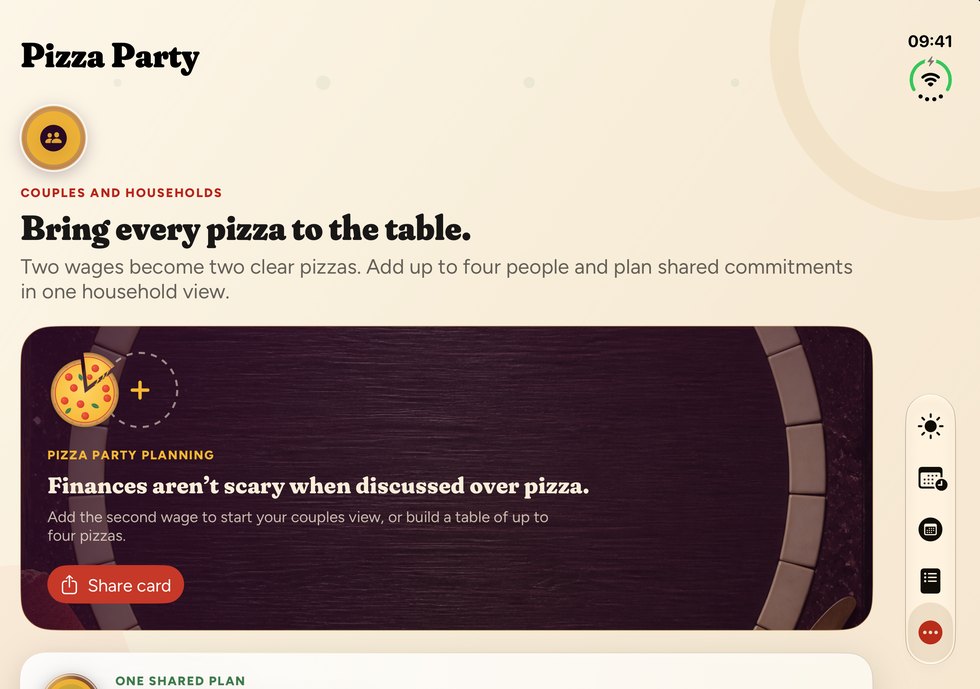
Pizza Party

Two pizzas.
One shared table.

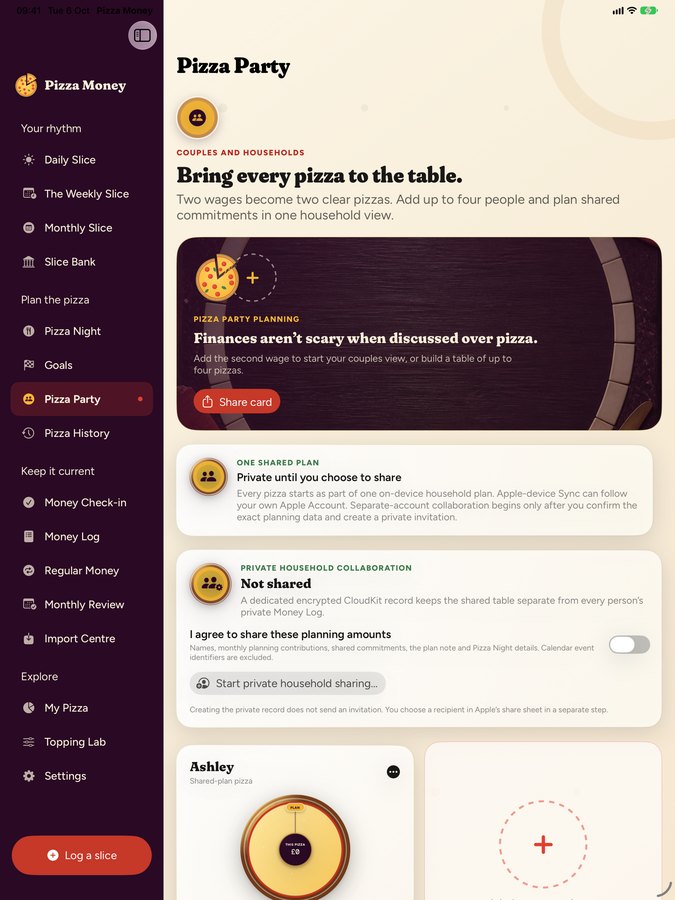
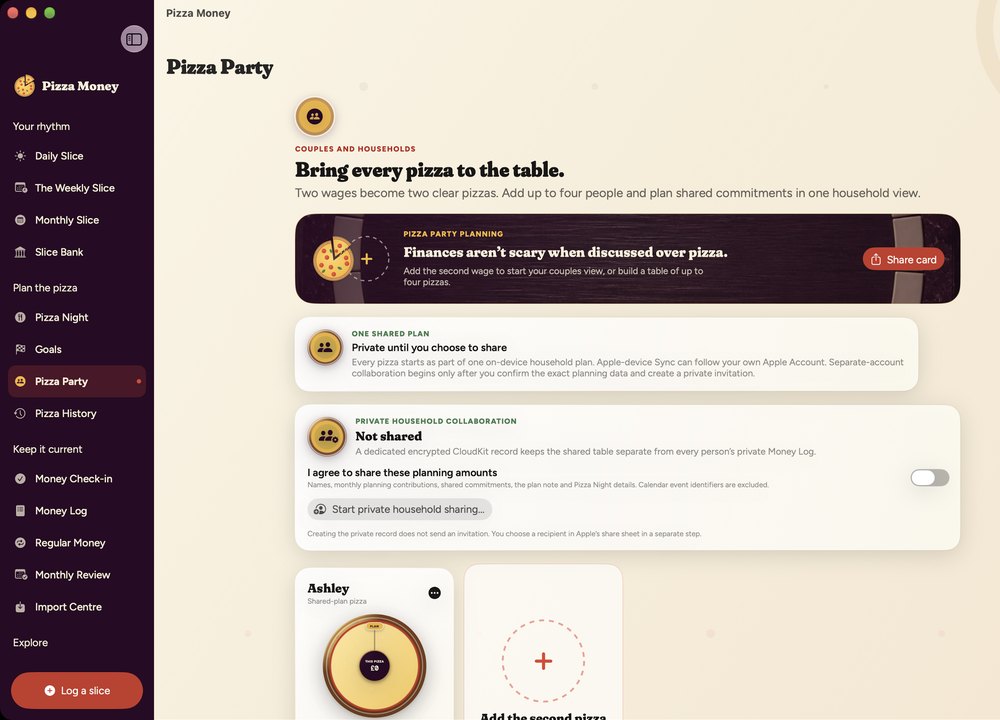
Sharing a budget usually means sharing everything, which is why most couples quietly give up on it. Slice splits the difference: you each keep your own pizza, and only the bit in the middle is shared.

One person's pizza
Your pizzaYour log, your slices, private
The other person's pizza, loaded with peppers
Their pizzaTheir log, their slices, private
🤝

One plan, two people

Rent, bills, the big shared shop. You both see the same shared table and you both know who is covering what.

🙈

Your log stays yours

What you personally spend never crosses over. No merging, no awkward questions about that second coffee.

✉️

Invited, not published

Invitations go through Apple's own share sheet, straight to the person you choose. There is no public link to leak.

🚪

Leave whenever

Either of you can step away from a shared plan at any time, and you each keep everything you put in.

Same pizza, bigger table

It's on your iPad
and your Mac too.

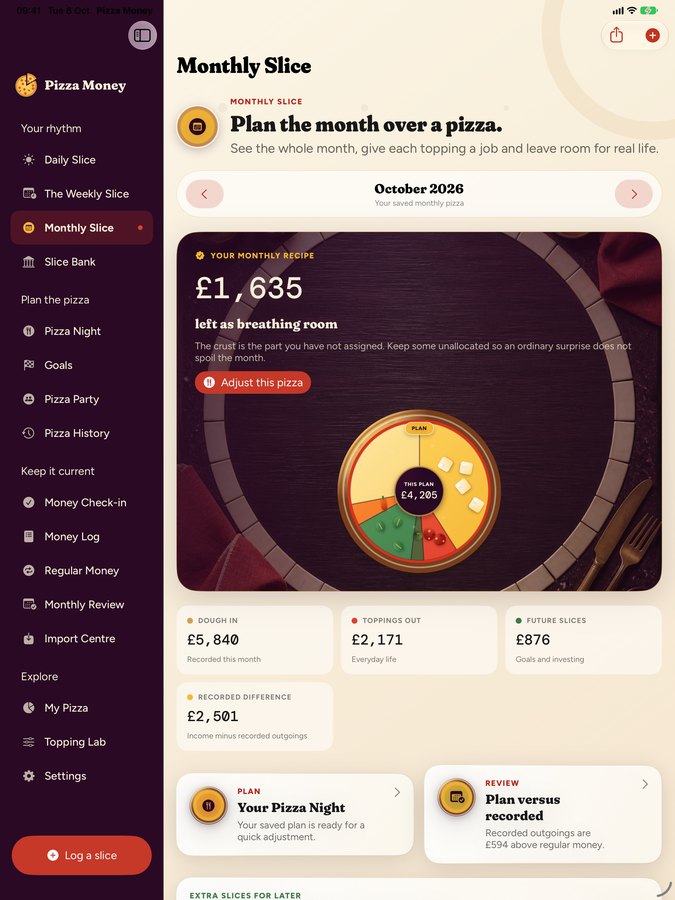
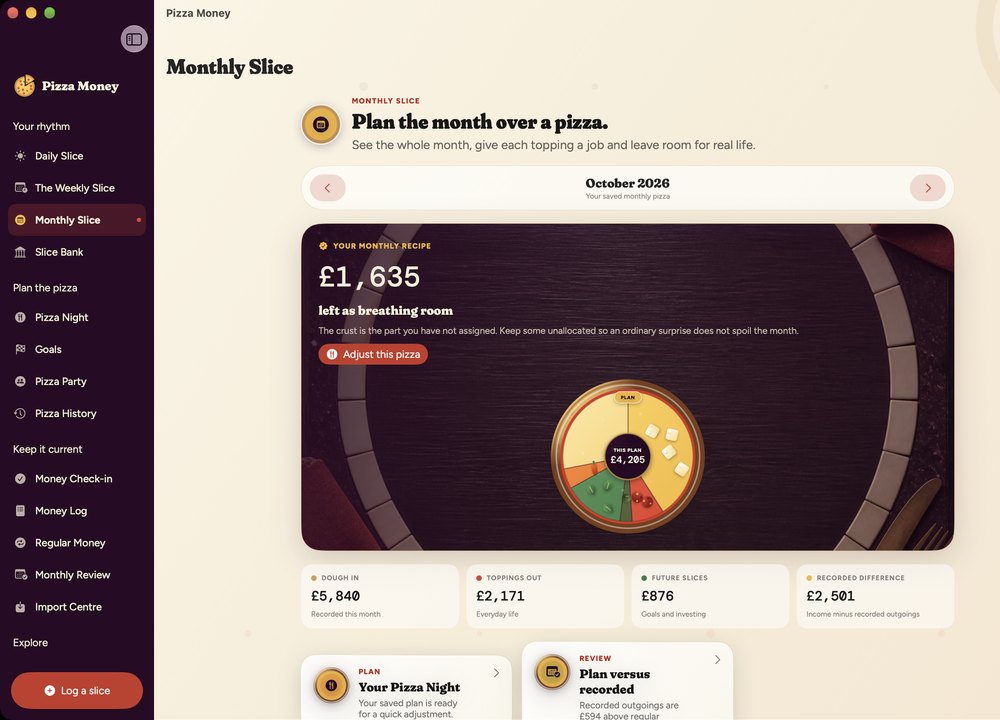
One plan, three screens, synced through your own private iCloud. On the big screens the sidebar comes out and the whole month gets room to breathe.

iPad

Slice Your Money on iPad: dailySlice Your Money on iPad: pizza nightSlice Your Money on iPad: weeklySlice Your Money on iPad: slice bankSlice Your Money on iPad: goalsSlice Your Money on iPad: pizza partySlice Your Money on iPad: monthly

Mac

Slice Your Money on Mac: dailySlice Your Money on Mac: pizza nightSlice Your Money on Mac: weeklySlice Your Money on Mac: slice bankSlice Your Money on Mac: goalsSlice Your Money on Mac: pizza partySlice Your Money on Mac: monthly

The part most apps hope you skip

Local-first,
and private by default.

Your financial records are local-first; if you enable iCloud sync, they live in your private iCloud storage. We don't run a server that holds your financial data, so there is nothing on our side to sell, leak or hand over.

🔐

No bank logins, ever

Slice never asks for your online banking. There's no Open Banking connection to revoke, because there was never one to grant.

☁️

Your iCloud, not ours

Sync uses your own private CloudKit database, inside your iCloud account. We store no financial records on our servers, and we can't browse, query or export yours.

🚫

No trackers, no ads

No analytics SDK. No advertising ID. No crash reporter phoning home. The app ships with zero third-party code.

📤

Leave whenever

Export the lot or delete the lot, in two taps, in the free version. Data portability isn't a paid feature here.

Read the full privacy policy →

Pricing

Free forever. Actually.

Not a trial. Not "free for 30 days". The free version is a genuinely complete budgeting app, and sync, export and deletion are never behind the paywall.

Start daily in under 2 minutes.

Free

£0

forever, no card, no account

  • Daily, Weekly and Monthly Slice
  • Slice Bank month grid
  • Regular money & goals
  • Payday widget
  • iCloud sync, export & delete
  • Your first two Pizza Nights
Download free

Plus monthly

£2.99

per month, cancel any time

  • Everything in Free
  • Unlimited Pizza Nights
  • Full month-by-month history
  • Copy last month forward
  • Your own custom toppings
Start with Plus
Best value

Plus yearly

£19.99

per year, saves £15.89

  • Everything in Plus
  • Roughly half the monthly price
  • One payment, one reminder a year
  • Switch to lifetime whenever
Get Plus yearly

Plus forever

£29.99

one payment, then never again

  • Everything in Plus, permanently
  • No renewals, nothing to cancel
  • Every future Plus feature included
  • Restores on all your Apple devices
Buy once

Prices shown per storefront and may vary slightly with local tax. Purchases are handled entirely by Apple. We never see your payment details.

Questions, answered properly

The bit before you download.

Does it connect to my bank?

No, and that's deliberate. Slice never asks for online banking credentials and has no Open Banking integration. You log what matters, which takes seconds, and in exchange there's no third party sitting between you and your money, and nothing to breach.

If typing feels like a chore, you can import a statement file your bank exports (CSV, OFX or QIF) and Slice will read it on your device.

Where is my data actually stored?

On your device, and (if you turn sync on) in your own private iCloud database. We don't store your financial records on Slice Your Money servers, and we can't browse, query or export what's in your iCloud. We operate no server that holds your financial data, so there is nothing on our side to sell, leak or be subpoenaed for. How iCloud itself is secured is Apple's domain, and is covered by Apple's own privacy documentation.

What's genuinely free?

Everything you need to run your money: daily logging, weekly and monthly views, Slice Bank, goals, regular money, the widget, iCloud sync, and full export and deletion. The first two completed Pizza Nights are included too. Plus adds unlimited Pizza Nights, the full history table, plan copy-forward and custom toppings.

Can my partner and I share a budget?

Yes. Pizza Party lets you share a plan with someone without merging your private logs. You see the shared table and the shared bills; your individual spending stays private. Invitations are sent through Apple's share sheet directly to the person you choose, never as a public link.

Which currencies does it support?

Pounds, euros and dollars. It asks where you are when you first open it and suggests one, and you can change it whenever you like in Settings. Amounts are relabelled rather than converted, so switching never rewrites your history at some exchange rate you didn't choose.

Will it tell me off?

No. There are no streaks to break, no shame notifications, no red bar shouting that you've "failed" a category. When something's tight, Slice says so plainly and suggests one thing you could do. That's the whole tone of it.

Is it on Android?

Not today. Slice is built natively for iPhone, iPad and Mac, and leans hard on Apple frameworks (private CloudKit sync, widgets, Face ID lock) that make the privacy promises above possible. One good platform beats two mediocre ones.

Is any of this financial advice?

No. Genuinely, no. Every figure Slice shows you is arithmetic performed on numbers you typed in. It doesn't fetch your balance, read your statements on its own, know what you actually earn, or check whether what you told it is true. If you enter your rent as £5 instead of £500, Slice will cheerfully plan a very relaxed month for you.

Nothing in the app is regulated financial advice, a recommendation, or a prediction. We're not authorised by the Financial Conduct Authority and we're not pretending to be. Plans and projections are educational tools for organising your own thinking. The decisions, and the responsibility for them, stay entirely with you.

If you need real advice about debt, investments, pensions or tax, please talk to a qualified professional. In the UK, MoneyHelper and Citizens Advice both offer it free and impartially.

Does it recommend a pizza?

Also no. We have opinions, but we're keeping them to ourselves.

The pizza is a way of picturing your month, not a suggestion about dinner, and Slice has no view on pineapple, stuffed crust, or whether a calzone counts. We don't recommend pizzas any more than we recommend investments, and we're roughly equally unqualified to do either.

What if I stop paying for Plus?

Nothing is deleted, ever. Your plans and entries stay exactly where they are and the free app keeps working. You simply lose access to the Plus extras until you resubscribe. Cancelling is not a punishment.

So what's the third great thing in life?

Well, we'll leave that one for you to decide.

We're a budgeting app. We know our limits. But if money and pizza are both sorted, you should have a bit more room for whatever it turns out to be.

Right then.
Shall we get the oven on?

Free on the App Store. About four minutes to set up, then roughly ten seconds a day. The most fulfilling ten seconds your money will get.

Download on the App Store Download on the Mac App Store